
Introduction
Adaptive Pad is an Unreal Engine plugin by Altercode for the DualSense™ wireless controller on Windows. It gives your game adaptive triggers, lightbar, player and mute LEDs, rumble, the speaker, every button, the touchpad and the motion sensors, from Blueprints or C++.
From install to your first effect
Three steps take you from the Fab download to a trigger that pushes back in your own project. Each one links to the page with every detail.
Set up the plugin
Install Adaptive Pad to your engine from the Fab library in the Epic Games Launcher. Then open your project, go to Edit → Plugins and check that Adaptive Pad is enabled. It's in the Input category.

Full walkthrough, including the C++ module dependency and RawInput: Installation.
Connect the controller and press Play
Plug the DualSense™ wireless controller in with a USB cable, or pair it over Bluetooth in the Windows settings. You don't need a driver or any other software. Press Play: the Output Log shows LogDualSense: DualSense #0 connected (USB), and the controller works like any gamepad. If your project already has gamepad mappings (the Unreal templates do), it moves your character straight away.
To map its buttons, use Enhanced Input as you would for any gamepad: Input.
Apply an effect from a Blueprint
In any Blueprint (Character, Player Controller, Level Blueprint or an Actor Component), right-click in the Event Graph and type DS to see every node of the plugin. Set what you want, then call DS Update Output to send it to the controller:
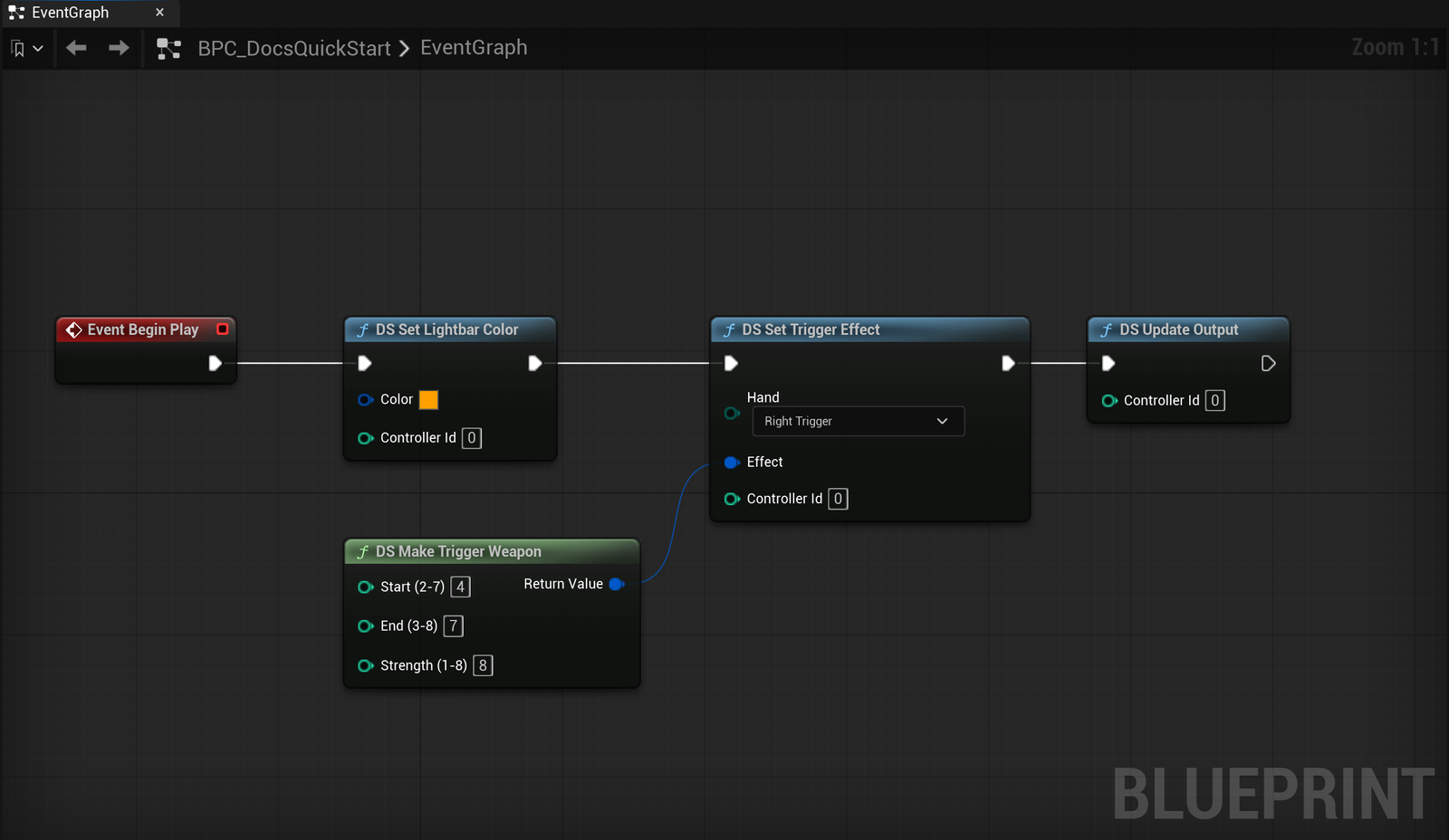
Press Play and squeeze R2: it resists from halfway, then gives way with a click. Step by step, with the same graph to copy: Quick start. To tie effects to your gameplay (equipping, damage, menus, end of level): Use it in your project.
What you get
Adaptive triggers
Native input
Lightbar and LEDs
Motion and touchpad
Requirements
| Unreal Engine | 5.6, 5.7 and 5.8 |
| Platform | Windows 64-bit only. The plugin talks to the controller through the Windows HID API. |
| Controllers | DualSense™ and DualSense Edge™ wireless controllers, over USB or Bluetooth. Up to 4 at the same time. |
| Project | Blueprint-only or C++. No engine changes and nothing to install for your players. |
How it works
The plugin has three parts, and you only touch the last one:
- An input device. It reads the controller over HID and feeds buttons, sticks and triggers to Unreal, the same way an Xbox controller does. Enhanced Input, Input Mapping Contexts and
InputKeyevents all work. - A Game Instance Subsystem (
UDualSenseSubsystem). It keeps the output state of each controller: lightbar, LEDs, rumble and the two trigger effects. - A Blueprint node library. Every node starts with
DS. TheDS Set ...nodes change the stored state, andDS Update Outputsends it to the controller.
DS Set Lightbar Color ─┐
DS Set Trigger Effect ─┼─▶ DS Update Output ─▶ controller
DS Set Rumble ─────────┘
The state is kept between calls, so you only send what changed: setting the lightbar does not reset the triggers, and the plugin skips the write when nothing is different.