
Quick start
This example gives R2 a resistance that gives way with a click (the Weapon effect) and turns the lightbar orange as soon as the game starts. It works in any Blueprint: the Level Blueprint, your Character or your Player Controller.
The Blueprint
This is how it looks in the Blueprint editor, here in an Actor Component that you can add to your character or Player Controller:
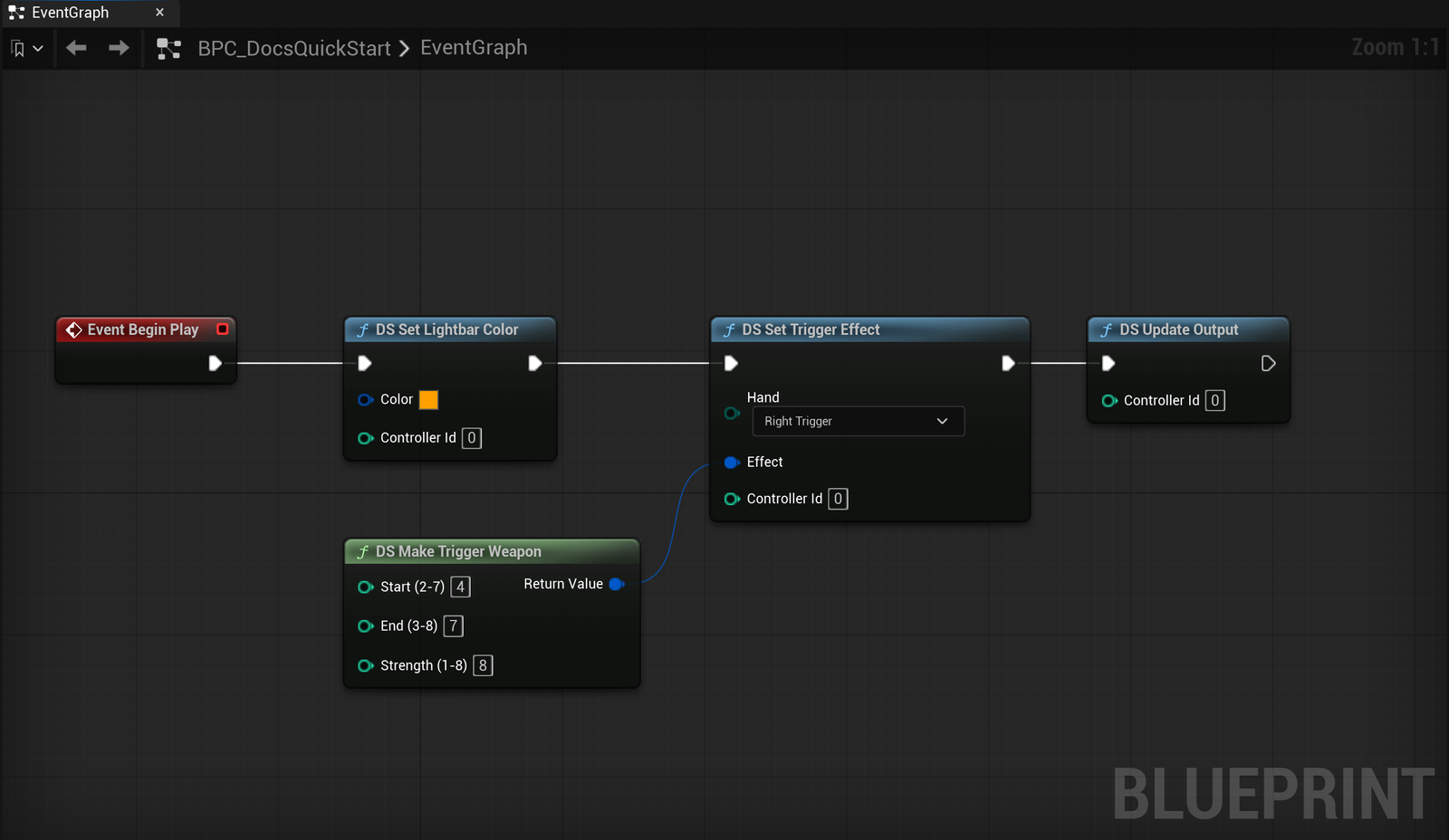
The same graph, ready to copy:
Step by step
Start from an event
Use Event BeginPlay, or any event where the effect should start (grabbing a lever, entering a vehicle...).
Set the lightbar
Add DS Set Lightbar Color and pick a colour. Controller Id is the controller slot: 0 is the first controller.
Build the trigger effect
Add DS Make Trigger Weapon: Start 4, End 7, Strength 8. Positions are trigger zones from 0 (released) to 9 (fully pressed).
Apply it to R2
Add DS Set Trigger Effect with Hand = Right Trigger and plug the effect in.
Send everything
End the chain with DS Update Output. Until you call it, the DS Set ... nodes only change the stored state.
Press Play and squeeze R2: the trigger resists from about halfway, then gives way with a click near the end.
The same in C++
#include "UDualSenseSubsystem.h"

void AMyCharacter::BeginPlay()
{
    Super::BeginPlay();

    if (UDualSenseSubsystem* Pad = GetGameInstance()->GetSubsystem<UDualSenseSubsystem>())
    {
        Pad->SetLightbarColor(0, FLinearColor(1.f, 0.35f, 0.f));
        Pad->SetTriggerEffect(0, EDSTriggerHand::Right, FDS5TriggerEffect::MakeWeapon(4, 7, 8));
        Pad->UpdateOutput(0);
    }
}
Add AdaptivePad to the dependencies in your .Build.cs:
PublicDependencyModuleNames.AddRange(new string[] { "Core", "CoreUObject", "Engine", "AdaptivePad" });
Turning it off
To free the trigger again, call DS Stop Trigger (or DS Set Trigger Effect with an Off effect) and then DS Update Output. DS Reset Controller State clears everything at once: lightbar, LEDs, rumble and both triggers.
Where to go next
- Adaptive triggers: all 12 effects and their parameters.
- Input: reading buttons and sticks with Enhanced Input.
- Blueprint nodes: every
DSnode.
Installation
Install Adaptive Pad from your Fab library into Unreal Engine 5.6, 5.7 or 5.8, enable it in your project and check that the controller is detected.
Use it in your project
How to wire Adaptive Pad into a real game, from where the logic lives to turning effects on and off with your gameplay and cleaning up at the end of a level.